Hot Wheels Showcase™
- 4.6
- Rating
- 100.00K
- Installs
- Free
- Price

 Analysis by App-foxy
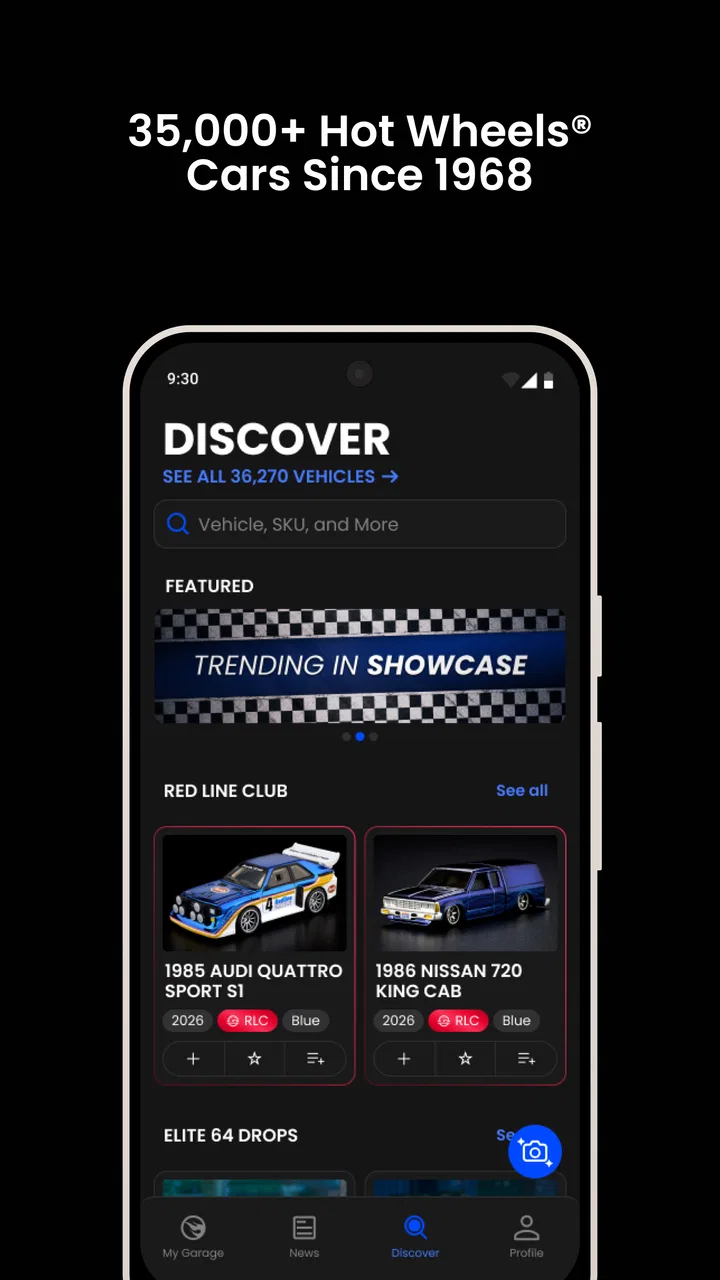
I approached Hot Wheels Showcase™ as a collector’s companion rather than as another racing game. That distinction matters immediately: its purpose is to help me discover Hot Wheels die-cast cars, keep track of a collection, and turn a shelf of small vehicles into something I can manage from my phone. Developed by Mattel, it sits in the lifestyle category, and the free entry point makes it easy to try without committing money first.
My overall impression is positive, especially for someone who buys cars regularly and wants a clearer record of what is already owned. The app feels most useful when it becomes part of a repeatable collecting routine: check before shopping, add new arrivals soon after buying them, and use the digital collection as a quick reference instead of relying on memory. It is less compelling for a casual fan with only a few cars or for someone who wants a full marketplace, social network, or detailed valuation tool.
Using Hot Wheels Showcase™ without getting stuck
I find the easiest way to keep this collection manageable is to start with a small, useful slice rather than trying to digitize every car at once. I’d begin with recent purchases or models I often encounter while shopping, then use that first batch to settle on a consistent way to identify and review entries. That simple routine makes the app easier to rely on and sets up the next question: how to tell a genuine app snag from an avoidable cataloging mistake.
You May Also Like

 Blood Strike: 2.5 Anniversary
Blood Strike’s Loadouts Turn Every Drop Into a Tactical Gamble
A close look at Blood Strike’s custom loadouts: how fast access to signature weapons reshapes its battle royale rhythm, rewards preparation, and narrows the gap between fights.

 Pandora - Music & Podcasts
Pandora’s Music Is Easy to Start, but Harder to Recover
Pandora’s strength is its low-effort path from a seed to a station. Its weak spot is how much confidence it asks you to place in connection, setup, and quiet recovery.

 8 Ball Pool
 Is Built on Rivalries, Rematches, and Routine
A close look at the rivalries, rematches, shared routines, and unanswered safety questions that turn a quick pool match into a persistent mobile community.

 Samsung Music
’s Quiet Strength Is Playing What You Already Own
Its reach comes less from spectacle than from dependable access to a personal library. That simplicity is both the app’s strongest retention engine and its ceiling.

 AccuWeather: Weather Radar
AccuWeather Review: A Quick, Clear Forecast for Everyday Decisions
For everyday plans, the best forecast is the one you can understand quickly. AccuWeather makes rain timing, radar, and local conditions easy to act on, with a few trade-offs.

 Hill Climb Racing
Why Hill Climb Racing Still Turns Crashes Into One More Run
A tiny car, a bumpy hill and one more upgrade: Hill Climb Racing keeps resurfacing because its simple chaos makes every near-miss feel personal.
More From Our News Desk



The first friction is deciding how to organize a real collection
The hardest part is not necessarily opening the app; it is translating a physical collection into a digital one. A collector may have cars in display cases, storage bins, unopened packages, and loose piles gathered over several years. Trying to enter everything in one long session can make the process feel like a chore. I found the more sensible approach is to begin with the cars I actually need to reference most often, such as duplicates, recent purchases, or models I regularly see while shopping.
That approach also reduces mistakes. When several cars look similar, rushing through the collection can lead to adding the wrong version or assuming that a familiar casting represents every variation. I would treat each entry as a deliberate identification step, checking the physical car and packaging rather than tapping through a list as quickly as possible. The app is valuable as a collection record only when the record reflects what is really on the shelf.
A useful habit is to separate “owned,” “newly acquired,” and “needs checking” in your own routine, even if your physical storage system uses different labels. I might place uncertain cars in one box, add the easy matches first, and return to the uncertain group later. This prevents one confusing item from stopping the entire cataloging session.
What to check before assuming the app is broken
When a collection tool appears not to respond correctly, I first check the simple things: whether the phone has a stable connection, whether the app is fully updated, and whether I am signed into the account or device setup I normally use. I also close and reopen the app before repeating an action. These steps sound basic, but they separate a temporary loading problem from a genuine issue with the item I am trying to record.
The current version is 1.7.0, and the app requires at least iOS or Android version 9. That makes the operating-system check especially important on an older phone. If the store page allows installation but the experience is unstable, I would still confirm that the device is running a supported system and has enough free storage for normal app operation. I would not start by deleting collection information or reinstalling.
Another practical check is to slow down when scanning or selecting a car. A reflective package, poor lighting, glare, or a partially hidden label can make identification harder than it appears. Moving the car onto a plain surface and checking it under even light is a safer first response than repeatedly tapping the same control. The goal is to improve the information going into the app, not just to force the app to accept it.
A recovery routine that protects your collection record
If an entry does not appear after I add it, I avoid immediately creating it again. Duplicate records are more frustrating than a delayed update because they make the collection less trustworthy. I first leave the relevant screen, return to the collection, and look for the item there. If it still is not visible, I restart the app and check again before trying the operation once more.
I also recommend keeping the physical cars nearby while building the digital record. That gives me a quick way to confirm whether the app saved the intended vehicle, rather than relying on a vague memory of what I entered. For a large collection, I would work in small batches and pause occasionally to review them. This creates natural checkpoints and makes it easier to identify where a problem started.
For collectors who are moving between devices, I would be cautious about assuming that every change is instantly available everywhere. I would complete a small test entry, wait for the app to reflect it, and then confirm that the collection looks right before doing a larger import or cleanup. That is a general recovery strategy, not a promise about a particular synchronization method, but it prevents a lot of avoidable confusion.
If a screen keeps failing, I would record the exact action that caused the problem: opening the collection, searching for a model, adding an item, or returning from another screen. Note whether the issue happens with one car or every car, and whether it survives a restart. That information is much more useful when seeking support than saying only that “the app does not work.”
When the problem is really the phone, connection, or collection method
Not every frustrating result comes from Hot Wheels Showcase™. A weak connection can affect loading, while an aging device can make switching between screens feel slow. A phone with a cluttered camera lens or a dim display can also make the identification process less reliable. Before blaming the app, I would test it with a different item and in better lighting. If one car works and another does not, the issue may be the item’s presentation or how distinctive its details are.
There is also a human problem: collectors often remember a car by its color or general shape, while variations may share most of the same appearance. If the app’s result seems surprising, I would compare the physical base, packaging details, or other identifying marks rather than assuming the digital result is wrong. This is one reason I see the app as a cataloging aid, not a replacement for careful collecting knowledge.
For shopping trips, I would use the collection as a reference before entering a store, then verify purchases afterward. I would not treat a missing digital entry as proof that a car is absent from the physical collection. A car may be in an unprocessed box, stored with another family member, or entered under a detail I do not immediately remember. The app can reduce duplicate buying, but only if the household agrees on a consistent way to record new cars.
How it compares with a notebook, spreadsheet, or memory
A notebook is flexible and fast for rough notes, but it becomes difficult to search once the collection grows. A spreadsheet offers more control over custom fields and sorting, yet it requires manual setup and maintenance. Memory is convenient until a shopping trip presents several similar cars. Hot Wheels Showcase™ sits between those options: it is more focused than a general spreadsheet and more useful for quick collection checks than handwritten pages.
The trade-off is control. Someone who wants custom columns for purchase location, condition, trade status, personal value, or detailed variation notes may prefer a spreadsheet. Someone who wants an informal list with no setup may find any digital catalog excessive. The app makes the most sense for collectors who want a purpose-built record and are willing to keep it current.
I also would not confuse it with a buying or trading platform. Its appeal is collection management and discovery, not replacing every tool a serious collector might use. If your main goal is comparing prices, arranging trades, or maintaining a complex inventory for resale, a specialized service or carefully designed spreadsheet may suit you better. For personal ownership tracking, however, the focused design is an advantage because it avoids the overhead of building a system from scratch.
Small workflows that make the app more useful
My preferred workflow is to use three short sessions instead of one exhausting cataloging marathon. First, I identify the cars that are easiest to recognize. Second, I review uncertain entries with the physical vehicles in hand. Third, I check the digital collection before the next shopping trip. This rhythm keeps the record useful without turning collecting into administrative work.
Another good use is household coordination. If several people buy Hot Wheels, the person making the purchase can check the digital collection before paying, while the owner can add the new car later at home. That reduces the pressure to complete every step in a store aisle. It also makes the app practical for parents and children: one person can handle the phone while the other compares the physical car, with an adult checking ambiguous entries.
I would keep unopened cars and loose cars mentally separate while cataloging, even if the app presents them within the same collection. Packaging condition can matter to collectors, and a digital record may not replace the notes you personally need about condition or storage. A simple physical storage system alongside the app remains worthwhile. The strongest setup is not “app only”; it is the app plus a sensible shelf, box, or display arrangement.
For people worried about accidental duplicates, I suggest checking the collection before buying and again after adding a purchase. That two-step habit catches both shopping mistakes and entry mistakes. It is more reliable than expecting the app to solve every identification question automatically, and it takes less time than sorting through a growing pile of duplicate cars later.
Who should install it, and who should skip it
I would recommend it to active Hot Wheels collectors, families building a shared collection, and anyone who frequently forgets which cars are already owned. It is also a good fit for a new collector who wants to create an organized habit from the beginning instead of rebuilding a record after the collection becomes difficult to track.
I would be less enthusiastic for someone with only a handful of cars who has no interest in expanding the collection. A short handwritten list may be quicker. I would also point serious resellers or collectors who need extensive custom fields toward a more configurable inventory system. The focused nature that makes this app approachable can feel restrictive when your records need to cover business details, grading, trade history, or personal valuation.
The app is free to start, which lowers the risk of trying it, but optional in-app purchases range from $1.99 to $14.99 per item. I would explore the basic workflow first and only spend money if the added content genuinely improves the way I collect. A free app is not automatically the right choice if its purchase options do not match your needs, so I would decide based on regular use rather than curiosity on the first day.
What the store figures suggest about its maturity
Hot Wheels Showcase™ carries an average rating of 4.6 from around 8.4 thousand ratings, with 345 written reviews and over 100 thousand installs. Those figures suggest that it has found an audience beyond a tiny group of early testers, while the written reviews are still worth reading for patterns around setup and collection management. I would interpret the rating as encouraging, not as a guarantee that every device or collecting style will feel identical.
It is rated for Everyone, which fits the family-friendly subject matter and makes it approachable for younger collectors using a parent-managed phone. The app was released on September 4, 2025, so I would keep expectations realistic about a product that is still relatively young. Newer apps can feel focused and fresh, but they may also change their workflows as more collectors use them.
My practical verdict after using it as a collector
Hot Wheels Showcase™ succeeds when I treat it as a quick, focused companion to physical collecting. It helps turn “I think I own that one” into a checkable record, and it gives a growing collection a clearer structure without asking me to build a database from nothing. The best results come from short cataloging sessions, careful identification, and a habit of checking before shopping.
Its limitations are equally clear. It cannot remove the need to recognize variations, maintain sensible physical storage, or decide which details matter to me. It is not the best answer for detailed resale inventory, highly customized records, or collectors who rarely buy new cars. Some setup and recovery friction is also likely to come from the phone, connection, lighting, or rushed data entry rather than from the app itself.
For my recommendation, I would install it if Hot Wheels collecting is an ongoing hobby and I want a purpose-built way to keep track of it. I would begin with a small group of cars, test the add-and-review routine, and expand only after the collection looks accurate. The key is to use it as a dependable checkpoint, not as a substitute for careful collecting. With that expectation, Mattel’s lifestyle app is a useful addition for everyday collectors and an easy one to leave behind if a notebook or flexible spreadsheet already does everything they need.
FAQs for Hot Wheels Showcase™
01What is Hot Wheels Showcase™?
Hot Wheels Showcase™ is a racing and collection-focused mobile game built around the famous Hot Wheels toy brand. Players can drive miniature cars through colorful tracks, complete challenges, unlock new vehicles, and improve their collection. The game is designed for fans of arcade racing, toy cars, and short, action-packed sessions rather than realistic driving simulation.
02Is Hot Wheels Showcase™ free to download and play?
The game can generally be downloaded without an upfront purchase, but availability, pricing, and included content may vary depending on the Android or iOS store and your region. Like many mobile racing games, it may include optional in-app purchases for cars, upgrades, currency, or other content. Check the store listing and purchase settings before downloading, especially if children use the device.
03Does Hot Wheels Showcase™ require an internet connection?
Some features may work without a constant connection, particularly basic gameplay or previously downloaded content, but online access can be necessary for downloading updates, synchronizing progress, viewing advertisements, participating in events, or using certain connected services. Requirements may change after updates, so players should check the official store description and avoid assuming that every mode will remain available offline.
04What devices are compatible with Hot Wheels Showcase™?
Compatibility depends on the operating system version, device hardware, available storage, and the current release of the game. Newer phones and tablets usually provide smoother graphics and more reliable performance, while older devices may experience longer loading times, reduced visual quality, or crashes. Before installing, review the Google Play or App Store listing to confirm supported versions and required storage.
05Is Hot Wheels Showcase™ suitable for children?
Hot Wheels Showcase™ is aimed at a broad audience and its toy-car presentation can appeal strongly to children, but parents should review the age rating and store information before installation. The game may contain advertising, online features, or optional purchases. Using parental controls, disabling unauthorized payments, and checking privacy permissions are sensible precautions, particularly when younger players use a shared phone or tablet.
Pros
- Large collection of officially licensed Hot Wheels cars and tracks.
- Bright visuals and smooth animations suit younger players well.
- Simple controls make it easy to start playing quickly.
- Offers entertaining races and stunt-focused gameplay sessions.
- Recognizable toy designs add appeal for Hot Wheels fans.
Cons
- Some content may require purchases or additional downloads.
- Gameplay can become repetitive after extended sessions.
- May need substantial storage space on some devices.
- Fast action can be difficult for younger children at first.
- Performance may vary on older phones and tablets.

Hot Wheels Showcase™
Gallery